Attached a screenshot with questionable THD calculation when using an external generator. Software Version 1.220

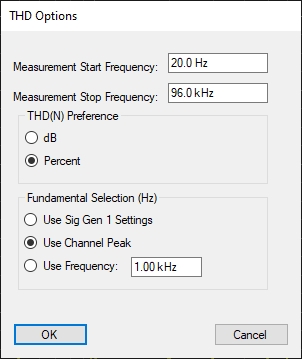
From the screenshot, I see that the fundamental is set to 1 kHz. Perhaps it would be sufficient to set the correct value for the fundamental in “THD Option” in the “Fundamental Selection” section.
Thank you. Changed to the fundamental frequency of my external generator and it seem to work. THD % calculation stops when I choose the highest peak which is the same fundamental. Why?
Hi @Sven, can you post a screen shot? If you select Channel Peak, you might also need to change the Measurement Stop Freq. If your peak isn’t inside the range of of start…stop freq, it won’t be used.
Here I set the measurement range from 20 to 96k, and selected “Use Channel Peak” and you can see it correctly found the peak and reported the THD. Note the green “F” at the very bottom of the graph at 40 kHz. That is telling you where the system sees the fundamental.


Hi Matt,
Here a different measurement since I changed the external Generator to another one. Attached the pics.
Regards
Sven

Hi Matt,
When I lower the fundamental frequency of my external generator then it works. But I get only the THD as dB and not % which I selected int the THD pane.
Best
Sven


Hi @Sven, yes, it looks like you are at 60 kHz, and so the second harmonic (and beyond) are 120 kHz, 180 kHz, etc. And these tones are more than Fs/2, so they cannot be measured. If you want to measure THD, you need to make sure at least the second harmonic is below Fs/2.
Hi @Sven, you need to select the measurement tile that you’d like. You can pick THD %, dB, etc

The settings you identified in the THD and THDN context menus are your preferred units, so when you hit the THD and THDN buttons (show below), it should automatically add the measurement tiles in your preferred units (dB or %).

PS. You can paste graphics directly into the forum. Just copy the image you’d like on your machine, and move to forum and paste it. Very helpful for technical discussions!
Hi Matt,
Thank you for your inputs. Seems that I need to learn more the program usage. But some of the settings are not really intuitive for me since settings are done in different panes and not knowing where the right mouse click opens a pane.
Best
Sven
Looks like 40 kHz. input, I see nothing present at 1 kHz..
Hi @Sven,
But some of the settings are not really intuitive for me since settings are done in different panes and not knowing where the right mouse click opens a pane.
Yes, it’s a fair point. Take a look at the picture below, and notice there is a white bar under GEN 1. That is a clue that right click opens a menu on that button. You can see GEN 2 and MULTITONE also have that bar under the text. But WHITE NOISE does not. That signifies that right click on WHITENOISE does nothing.
The aim is to put the functionality details in the same place you activate the functionality. So, if you are wondering how to set MULTITONE options, it should be clear to see you can do by right clicking on MULTITONE.

Hi Matt,
Again, thank you for clarification. Since I use the program only occasionally so keeping the things in mind is deteriorated.
Best
Sven


Claudio and Matt, sorry for my stupidness when looking at the config pane. Of course now it works.
Thank you.
Best, Sven