Help with 60hz noise

Hey all…

As I’m really really trying to use the 403 in place of my old Audio precision however I’m having an issue..

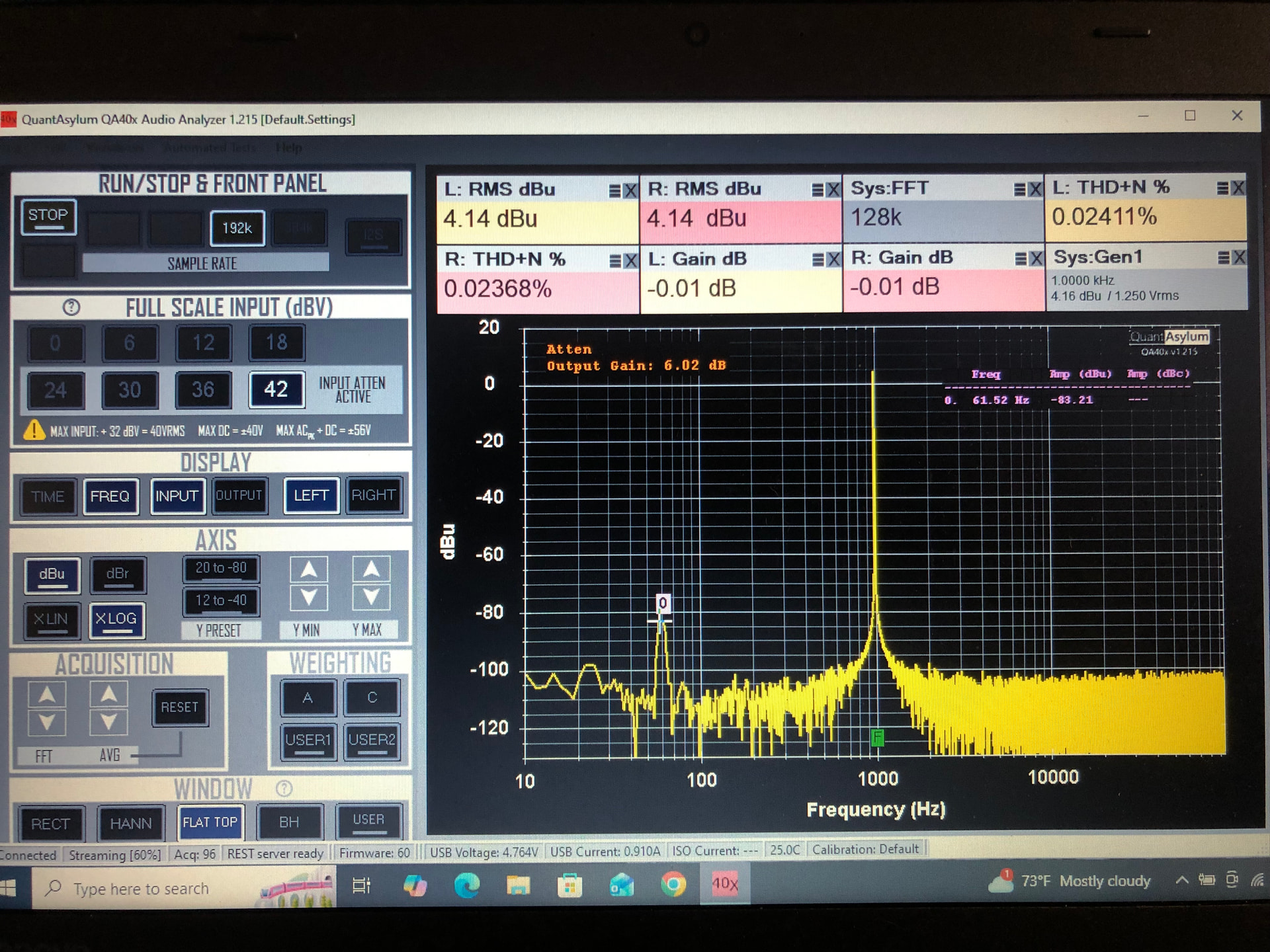
See fig 1.this is the 403 balanced with outputs to inputs. Notice 60hz at -80. This is with the laptop plugged in to power

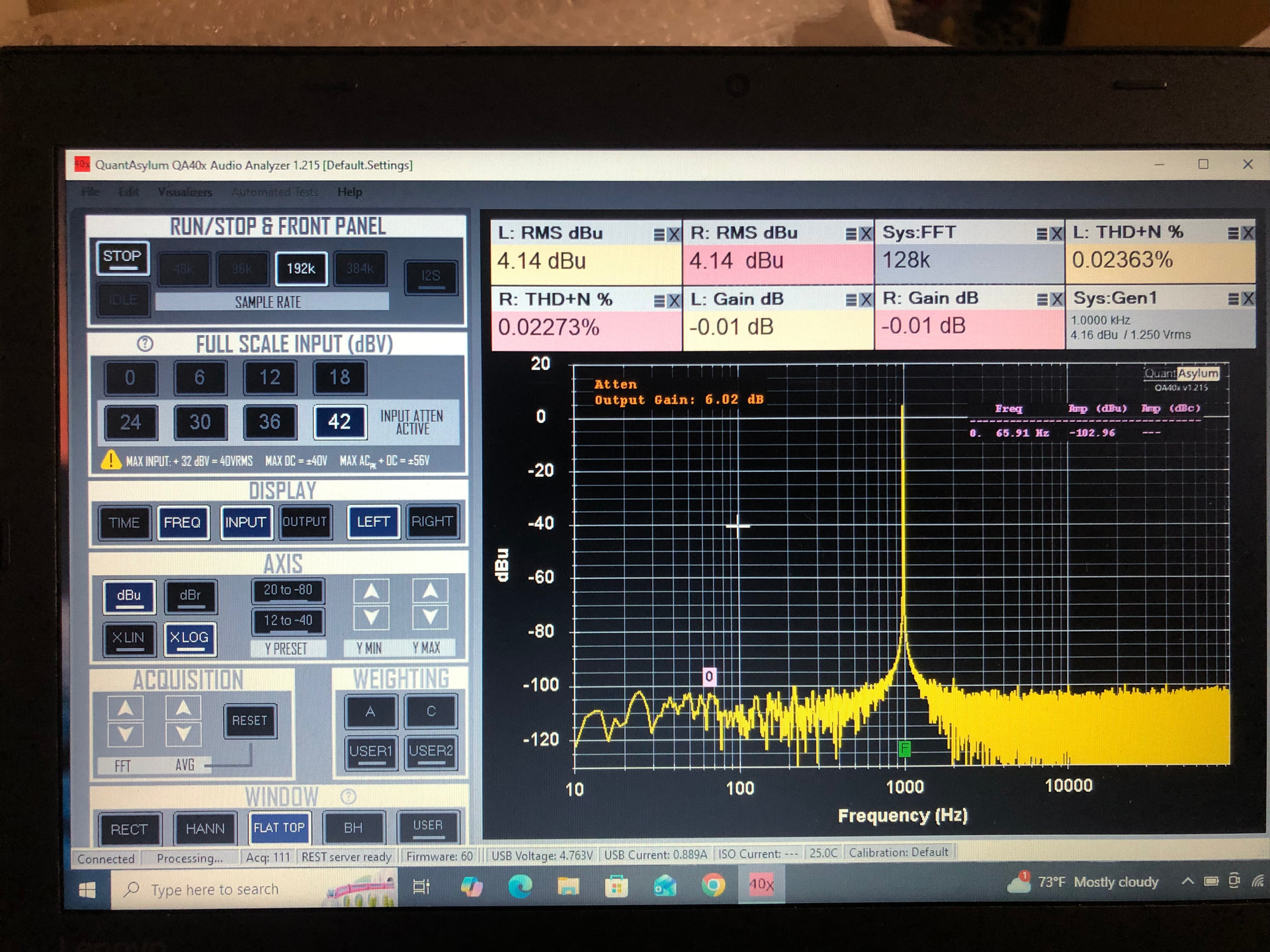
See fig 2: notice the noise at -100. This is with the laptop unplugged running.

Question how to get the -100 performance with the laptop plugged in? My ap doesn’t suffer from this at all. Always -108 on the ap…

Seems to be a loop but no way to really isolate it without doing something that will compromise the measurement..

Thanks a million for your suggestions..

Fig 1

Fig 2

Does your laptop supply have a two pin or three pin power lead? Can the lead/plug be rotated (like a figure 8 plug or the power plug itself)? Try that first.

The laptop supply may have one or more Y capacitors which can mess with otherwise isolated USB devices such as this 403.

The AP is not USB isolated, whereas the 403 is. I would try connecting the outer of the USB cable to the QA403 casework to see if that helps.

1 Like

I just went through all of this in working on replacing my Rohde & Schwarz UPD. My noise source ended up being a Furman PL-Plus used to power the bench top gear about 2 feet away. This was while I was on battery. Something the QA-403 could use after working on a few things with it cautiously so far is a bit better noise immunity. I did not have to deal with this at all on the UPD, but it cost more than my house when it was new.

With the having to make adapter cables and chasing lab/shop noise around, one thing we could use on the future QA series is a ground/shield lift at the connections too. It is software selectable on the UPD. It makes life with more normal cables possible and quickly pressing a button to fix potential ground loop problems (and not having a bunch of sets of cables with the shields only connected on one side). I am still soldering BNC’s to stuff. I will end up building a box with selectable inputs/ouputs, and loads so I can ditch all of the custom cables. I can’t drag this into a recording studio like this.

1 Like

Hi @amp-haus & @skipburrows, being USB powered, the QA403 doesn’t have a solid ground reference. A USB “ground” on a desktop PC might provide a ground in name, but when comparing to instruments with AC plugs, the AC-powered equipment are required to have grounds that are able to handle 33A (per IEC 61010) in the case of a fault, which is something a USB ground could never do.

So, when making measurements you need to keep in mind that a setup without an AC ground reference present will see the AC as a common mode signal and this can be conducted or radiated into the QA403. It’s not really possible to shield power line given the frequency. For H-fields, you can to some extent with exotic metals such as mu-metal. But for E-fields, it’s very difficult when hi-z inputs are involved.

Fortunately, it’s usually just a matter of giving the QA403 a solid ground reference and ensuring it’s a reasonable distance from magnetics associated with power line.

Here’s an experiment to try. Get a grounding plug with an alligator clip. These are commonly available on amazon for ESD control in labs:

https://www.amazon.com/Static-Care-Grounding-Alligator-Garments/dp/B08V5D9L7L

Now, make a measurement on a fully floating setup. In this case, I’ll use a QA403 and QA461 (QA462 is powered by a 12V supply, but that output is floating too. This is common for all ACDC bricks with two wire outputs, including laptop supplies).

Note the power line is ~74 dB below the signal.

Now, take your grounded alligator clip and touch it to any of the BNC on the QA403 or QA462. This gives the floating setup a “ground” reference, and with that reference, the CMRR of the input stages can reject the common signals (power line).

For what it’s worth, I just a got a Rigol MHO98 1 GHz scope to replace my Siglent 300 MHz scope. The MHO98 is a killer scope for $1400 (almost 1/3 the price of the Siglent when it was new). But in cutting costs, Rigol went with a USB-C power brick instead of a mains supply. Normally, a scope’s BNC inputs are tied to ground–they use the IEC PE (protective earth) to ensure the BNC inputs are tied tightly to ground. But with the USB-C brick, that ground reference is no more and there are measurement scenarios that benefit there, too, from a ground reference.

The upshot is that measurement equipment powered from a brick can benefit from a ground reference.

Skip, for your Fig 1, touch a ground to the loopback measurement (any of the BNC shells) and see if that makes it better. Chances are you picking up nearby power line E or H fields. You can verify this by rotating the QA403 in the air (while in loopback) and see if you can impact the height of the power line. If you can, it’s being radiated into the QA403 from nearby equipment and a ground reference will help. If you can’t, then it’s likely being conducted into the QA403 interior via the USB cable.

But in general, if you are seeing power line, it’s because everything is floating and it just needs a ground reference.

2 Likes

Not that this is relevant to your issue but since you are looking to replace an Audio Precision….

Rather than using the QA software, have you tried using the QA ASIO driver in combination with your existing AP software? If you’re familiar with the AP software, you’re probably much better off using it than the poor UI of the QA.

1 Like

“you’re probably much better off using it than the poor UI of the QA”

OUCH!

Not to toot my own horn but,

You might want to take a look at my software for the QA403 → MZachmann/QA40xPlot: Control a QA40x with a standard Windows GUI

Also check out these two threads.

Discussion of the software: QA40xPlot Thread - QuantAsylum Forum

My solution to the dreaded ‘make your own cables’: An XLR cable adapter - QA40x - QuantAsylum Forum

One big advantage of QA40xPlot vs using ASIO is smart control of the attenuator and output gain settings.

2 Likes

Yep I must have Attenuation control as I deal with a large range of levels in my designs and maintenance calls. I have no problem with the software other than the On/off aspect of the oscillator and the analysis. I am praying to the software gods that this can be corrected soon that is my biggest issue. The noise stuff I’m working on to try and make it happen for me. Thanks for the advice.

1 Like

You are killing me @matt. I am looking at upgrading my scope too and I have a lower end Siglent I think I gave $600 for. It is an SDS2202X-E. I had been looking at the Rigol as well as other Siglent scopes. Now I have something else to consider as that is about my price range for this round.

@amp-haus I think scope manufacturers have really worked out that enthusiasts of “gear” will jump on a new scope that comes to market with killer features, more bandwidth, more memory and a bigger screen more often than they really should.

It’s also a bit of a FOMO thing- they see a shiny new scope review with some killer features all at less money than last year’s model and, just like a new iPhone, they must buy it. Doesn’t matter that their “old” scope is working just as well as the day they bought it. The day they decided it was the killer scope they had to have- just a few short years ago.

Fast fashion scopes.

I lost count of the number of times I’ve put a shiny new DSO in my “cart” only to think on it for a few days and decide I don’t need it. 100MHz 4 channels is good enough for me. And a pile of old-skool CROs (20-60MHz) which all get more use than my DSO in the last 10 years.But that’s just me. :slight_smile:

1 Like

I have an old Analog Tektronix here too. What has me looking is I am having to deal with more and more digital DSP type gear, and the stuff for my Siglent is now all discontinued - and it is not that old. Next time I will have to buy all the kit at once. It failed to start the other day, but I was able to tear it apart and get it going, and we have an identical shop upstairs, so in a pinch I could always steal the scope there - but that kinda screws that work space most days. The R&S UPD has migrated to that floor while I continue my experimenting with the QA403 as a potential substitute. At least now we have two Audio Analyzers - it is nice to not have to wait for test gear. It is not uncommon for me to leave something I have finished repairing running overnight while I work on other things. Gear Hog I am.

1 Like

Yes, I’m a huge fan of your software!

my note to the poster was intended as a way to use the existing AnalogPrecision SW. I’m not willing to pay the large investment for the AP SW but if I already had it, I think it’s a highly regarded UI.

2 Likes

Yeah, that’s pretty ordinary having the Siglent modules/support discontinued already. It’s only about 4-6 years old?

I’d love to know who sells a modern, high performance DSO that does not contain a cooling fan. Am totally willing to sacrifice bandwidth, bits and features for high quality triggering, large screen and snappy feel without fan noise. I don’t want something running on embedded Android either.

2 Likes

The R&S UPD has migrated to that floor while I continue my experimenting with the QA403 as a potential substitute. At least now we have two Audio Analyzers - it is nice to not have to wait for test gear

A nice can of worms would be to compare some measurement results between the two analysers :slight_smile:

1 Like

On the 60/120/180 HZ issues I solved mine but not without lot of time spent chasing issues and building stuff. It took me a good week or two to settle in with this QA403. I was testing and confident on day one with the UPD.

I still have to do things with the QA I would not ever have to mess with like unplug the laptop power supply if I am testing something that the 60hz can be a problem with… and grounding the gen BNC input just mad things much worse here, terrible in fact. So I am not sold enough too buy one for the studio or the upstairs shop yet - the UPD is living up there for now.

Ya, I made the mistake of selling a fully analog R&S signal generator and buying a newer Siglent. I had to tear it apart and replace the fan with a nice ball bearing quiet fan - IT WAS LOUD!

@peppermint I will try to take some time to do some test before it leaves here, if it does. I may just start fully restoring it. The big standout in testing stuff from memory was that the generator on the UPD did not throw so many harmonics of it’s own.

But pure data etc is not the only thing that matters here if you are doing work like we do. Being able to just plug into it with normal cables is a HUGE help. Showing up at a clients studio with a pile of adapter cables, and a separate computer (ok I can deal with that) - and where do I put this stuff? my UPD has feet to set it on the ground facing up at you… so these are my issues and not the general users issues. Being able to throw nice square waves would be nice too.

Do not get me wrong - I LOVE MY QA403 - I just need a bit more out of it and the UI… including not having to deal with 60 HZ and harmonics thereof and induced noise from nearby electronics.

I did fix my 60HZ issue as I mentioned (kind of- I need to unplug from all power on my laptop), and I do keep in mind that my UPD is about 50 fricken pounds.

I am about to actually use the QA403 of the first time for real (after I built yet another adapter cable) so I am about to start a new post about our adventures with that.

1 Like