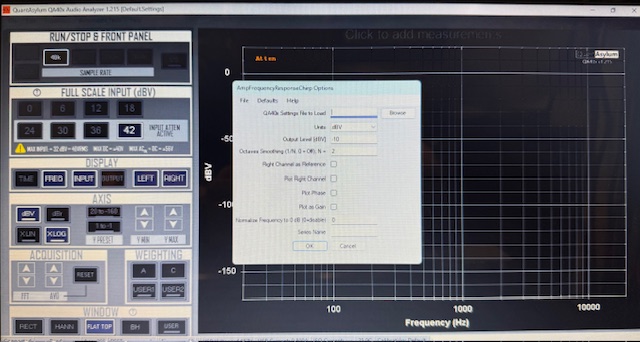
Chirp is a very strange generator. The factory software generates a chirp just like QA40xPlot but on receipt of the data it performs a filter transform to convert the received chirp into what you expect from a chirp. In particular, a chirp generates a downward sloping line (as you see in the last photo) but the chirp transformed is a horizontal line.
Qa40xPlot, at this time, does not do the inverse transformation so you’re seeing ‘raw’ data. When running the frequency response tests the right channel is used as a reference and so it doesn’t need the transformation.
As you can see with the downward sloping result the values at the high end of the frequency range are very very small compared with the values at the low end of the range so rescaling imho is iffy.
Also, yes, I don’t do any smoothing at this time. I’d rather see the measured data so it’s a personal preference.
Chirp is still pretty recent in QA40xPlot so this could easily change soon.
Mark
by the way… if you capture the Qa40xPlot image by using the “Photo” button it will produce a very high resolution easy-to-read image file.
Contents
Routine Settings 3
Saving Settings 3
Loading Settings 4
Saving the Screen Image 5
Markers and Cursors 5
Minimizing Hum and Noise in Measurements 6
Measuring High-Power Amplifiers 7
Shorting Blocks 8
Loopback Performance 8
Analyzer Noise vs FSI Setting 10
Analyzer THD vs FSI Margin 10
Gain Measurement 11
Frequency Response 13
Noise 14
User-defined Noise Weighting 17
Signal-to-Noise Ratio (SNR) 18
Noise Density 21
THD and THD+N 22
THD vs Output Power into 4 Ω and 8 Ω loads 23
Burst Power into 4-Ω and 2-Ω loads 24
THD vs Frequency 26
THD vs Frequency vs Output Power 28
THD Visualizers 29
GenEx Burst Waveform 31
CCIF 19 + 20 kHz 32
SMPTE IM 60 and 7000 Hz 35
Multitone IM 36
Crosstalk 40
Output Impedance and Damping Factor 41
Automated Measurements 44
Power Output - THD vs Power at 1 kHz 46
THD vs Power at 16 kHz 50
THD vs Power with 4-Ω Load 53
THD versus Frequency versus Input Level 54
Frequency Response 57
Frequency Response by Chirp 59
Output Impedance and Damping Factor 61
Crosstalk vs Frequency 63
Intermodulation Distortion vs dBV Input 65
Intermodulation Distortion vs Power 67
If you want to run the latest app go to https://mzachmann.github.io where you’ll find a link to the installer (which automatically updates to the latest version).
Hmmm, I’ve got it set to use .NET 9 as the base framework which I assumed mean all of them at least version 9. Try installing that specifically, I guess? What does the Details… button say?
PLATFORM VERSION INFO
Windows : 10.0.26200.0 (Win32NT)
Common Language Runtime : 4.0.30319.42000
System.Deployment.dll : 4.8.9221.0 built by: NET481REL1LAST_25H2
clr.dll : 4.8.9323.0 built by: NET481REL1LAST_25H2_C
dfdll.dll : 4.8.9221.0 built by: NET481REL1LAST_25H2
dfshim.dll : 10.0.26100.1882 (WinBuild.160101.0800)
ERROR SUMMARY
Below is a summary of the errors, details of these errors are listed later in the log.
* Activation of D:[Schematics]\Stereo\Bob Cordell\QA40xPlot.application resulted in exception. Following failure messages were detected:
Exception occurred during store operation.
Access is denied. (Exception from HRESULT: 0x80070005 (E_ACCESSDENIED))
COMPONENT STORE TRANSACTION FAILURE SUMMARY
* Transaction at [1/25/2026 4:38:46 PM]
Staging of a component file (Launcher.exe) did not succeed.
Setting one or more of the deployment metadata did not succeed.
WARNINGS
There were no warnings during this operation.
OPERATION PROGRESS STATUS
* [1/25/2026 4:38:39 PM] : Activation of D:[Schematics]\Stereo\Bob Cordell\QA40xPlot.application has started.
* [1/25/2026 4:38:39 PM] : Processing of deployment manifest has successfully completed.
* [1/25/2026 4:38:39 PM] : Installation of the application has started.
* [1/25/2026 4:38:39 PM] : Processing of application manifest has successfully completed.
* [1/25/2026 4:38:42 PM] : Found compatible runtime version 4.0.30319.
* [1/25/2026 4:38:42 PM] : Request of trust and detection of platform is complete.
* [1/25/2026 4:38:46 PM] : Downloading of subscription dependencies is complete.
* [1/25/2026 4:38:46 PM] : Commit of the downloaded application has started.
ERROR DETAILS
Following errors were detected during this operation.
* [1/25/2026 4:38:46 PM] System.Deployment.Application.DeploymentException (ComponentStore)
Exception occurred during store operation.
Source: System.Deployment
Stack trace:
at System.Deployment.Application.ComponentStore.SubmitStoreTransaction(StoreTransactionContext storeTxn, SubscriptionState subState)
at System.Deployment.Application.ComponentStore.SubmitStoreTransactionCheckQuota(StoreTransactionContext storeTxn, SubscriptionState subState)
at System.Deployment.Application.ComponentStore.CommitApplication(SubscriptionState subState, CommitApplicationParams commitParams)
at System.Deployment.Application.SubscriptionStore.CommitApplication(SubscriptionState& subState, CommitApplicationParams commitParams)
at System.Deployment.Application.ApplicationActivator.InstallApplication(SubscriptionState& subState, ActivationDescription actDesc)
at System.Deployment.Application.ApplicationActivator.PerformDeploymentActivation(Uri activationUri, Boolean isShortcut, String textualSubId, String deploymentProviderUrlFromExtension, BrowserSettings browserSettings, String& errorPageUrl, Uri& deploymentUri)
at System.Deployment.Application.ApplicationActivator.PerformDeploymentActivationWithRetry(Uri activationUri, Boolean isShortcut, String textualSubId, String deploymentProviderUrlFromExtension, BrowserSettings browserSettings, String& errorPageUrl)
— End of stack trace from previous location where exception was thrown —
at System.Runtime.ExceptionServices.ExceptionDispatchInfo.Throw()
at System.Deployment.Application.ApplicationActivator.PerformDeploymentActivationWithRetry(Uri activationUri, Boolean isShortcut, String textualSubId, String deploymentProviderUrlFromExtension, BrowserSettings browserSettings, String& errorPageUrl)
at System.Deployment.Application.ApplicationActivator.ActivateDeploymentWorker(Object state)
— Inner Exception —
System.UnauthorizedAccessException
Access is denied. (Exception from HRESULT: 0x80070005 (E_ACCESSDENIED))
Source: System.Deployment
Stack trace:
at System.Deployment.Internal.Isolation.IStore.Transact(IntPtr cOperation, StoreTransactionOperation rgOperations, UInt32 rgDispositions, Int32 rgResults)
at System.Deployment.Internal.Isolation.Store.Transact(StoreTransactionOperation operations, UInt32 rgDispositions, Int32 rgResults)
at System.Deployment.Application.ComponentStore.SubmitStoreTransaction(StoreTransactionContext storeTxn, SubscriptionState subState)
COMPONENT STORE TRANSACTION DETAILS
* Transaction at [1/25/2026 4:38:46 PM]
Also: your error message is strange. It says you are running the application/installer from a folder named: D:[Schematics]\Stereo\Bob Cordell\QA40xPlot.application is there a reason for that? When I look at the direct link it points me to https://mzachmann.github.io/QAPlot/QA40xPlot.application
That is the saved location for the file. When I click on your link it wants to download the file to my computer and that is where it is downloaded to, It will not run directly from your link.
and then you must click Install. I’m pretty sure that dialog is from the operating system.
The warning box is because I don’t want to pay thousand(s) of dollars a year for a security certificate. Perhaps your PC security is so tight that it refuses to allow install warnings? I hate to say this but possibly if you have a 3rd party AntiVirus running you should disable it before running the .application file. One remote possibility is that you need your download folder to be on drive C: but I doubt that.
I’ve been shipping the installer for half a year and have yet to get a bug report so this is strange and sounds like refusal to run the installer (I guess). Are you getting those dialog boxes (depending on browser) and clicking OK / Install?
Mark
Postscript: Since you have the .application file you might try right-clicking it and selecting Properties, then there should be an unblock option in the Properties dialog.