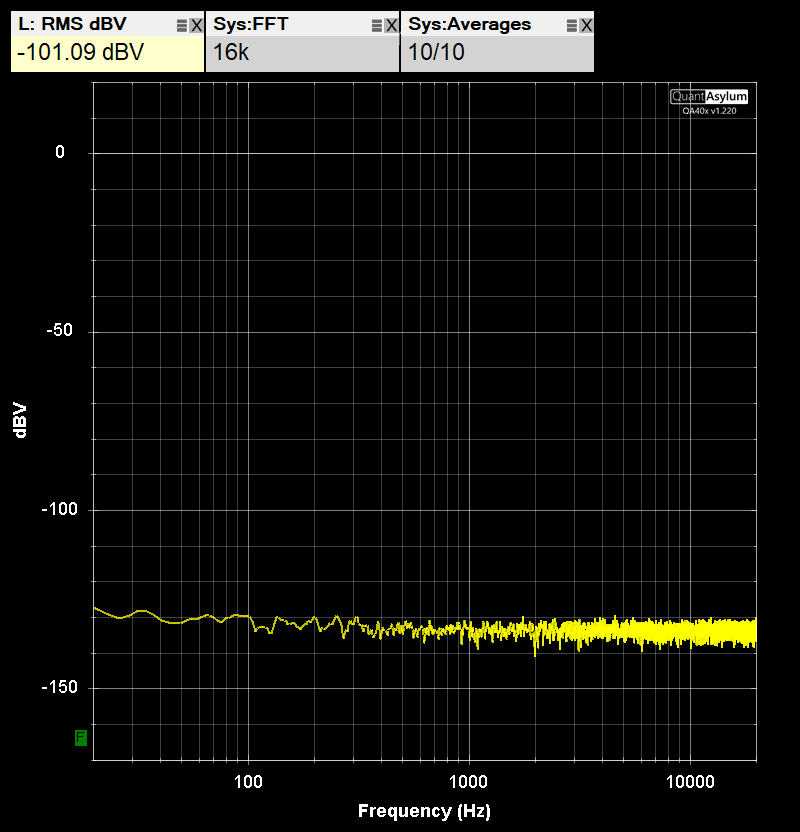
It looks like my QA472 is picking up mains hum. I have seen the measurements for QA472 posted on this forum and they look much cleaner. Although the noise that I’m seeing is rather low and may be negligible for acoustic measurements, I would like to understand whether I’m doing something wrong, or am I missing something.
The setup is: QA401 is connected to laptop running on battery, QA472 is connected to a standalone battery (I also tried: connecting to USB PSU, connecting to the same laptop—no change). The output from PRE1 of QA472 is connected to the input of QA401 using 1’ RG-6U cable (I also tried output from PRE2—same results). No microphones connected to QA472.
Below is the series of FFTs for the following states. First is what QA401 shows when it’s only floating cable connected to it (no QA472 on the other end). Then how it looks like when I connect QA472 powered off, we see 60 Hz peak. When I power up QA472, the peak gets higher, and extra noise appears (I tried moving and rotating QA472—the profile of the noise changes a bit, but it never disappears completely). The noise somewhat changes if I turn on gain. The last two shots are donw with 10 dB gain and with 20 dB gain:
I’m also using QA460 and I’m not seeing any issues when I’m connecting it to the same QA401. This problem seems to be specific to QA472. Please let me know if you need more information.
@matt I’m looking at your QA472 Measurements and they look better to me—less noise. Could you please check if my noise profiles look as expected, or maybe something is wrong here. Should I be shorting unused inputs as you have described in your post? Should I try giving some sine input—besides QA401 I also have “Victor’s oscillator”
Hi @mnaganov, can you set the QA472 to use the BNC inputs and short both inputs and share what you see?
If you are on a laptop connected to battery, your entire setup has no mains connection. Even if you use the laptop brick, you still have no mains connection to set the ground. So, the entire setup is floating and radiated powerline in your lab will appear as interference.
Amazon sells ground clips such as below that can be very helpful for learning where your system ground should be. You can plug this in (in only connects to the wall earth ground–line and neutral are plastic plugs), and then you have a aligator clip you can easily move around to find where the minimum powerline noise.
And PS: Here’s the QA472 on my bench connected to my QA403. Both BNC inputs on the QA472 are shorted via 50 ohms shorting block, the BNC inputs are selected, and gain is set to 20 dB. The QA403 L- INPUT is shorted, and the QA472 PRE 1 OUT goes to the L+ input on the QA403.
Thank you @matt ! I tried going outside with this setup since it’s fully portable, and I didn’t have any noise there so I confirmed that it’s indeed hum pickup problem, not an issue with the unit itself. I have ordered that grounding kit, will experiment with that.
I’ve found the source of the problem—it’s the USB cord which despite looking good turned out to have about 20 Ohm shield DC resistance, so I guess it was acting as an antenna picking up EM noise. I have changed the cord to a good one, and now when both QA472 and Q401 are connected to the same PC there is no noise.
Shorting unused inputs on QA472 was not helping, I suppose because the noise was coming via USB ground due to bad wire.
Thanks for looking into this, @matt I’m really glad I’ve got to the root of this problem!
To close up this topic, shorting the BNC inputs helped to lower the noise floor and also get rid of the small 60 Hz hump that was still there even with the good USB cable. Two important points though:
I have obtained BNC shorters—as opposed to “terminators” that have 50 or 75 Ohm resistor in line. The shorters actually help, while terminators not so much.
I also shorted unused inputs on the Q401 itself.
That got rid of any mains noise even with a fully “floating” set up.